 Button Designer
Free Stream Deck icon maker, button designer & key creator (unofficial)
Use this free, unofficial Stream Deck icon maker to design consistent, personalised icons for Stream Deck-compatible keys. Pick from thousands of icons, add text, and customise colours, backgrounds, and overlays to match your style. No sign-up, no download: it runs entirely in your browser.
Whatever you call them (key icons, button icons, button images, key art, macro key icons or deck tiles), this is a quick way to make a matching set. Popular uses include OBS and Streamlabs scene buttons, Twitch and YouTube stream controls, Discord and mic mute toggles, Spotify and media controls, Home Assistant and smart home shortcuts, app launchers and productivity macros.
Also compatible with Stream Deck alternatives such as Loupedeck, Razer Stream Controller, Logitech MX Creative Console, Ulanzi, Ajazz and Mirabox stream docks, Touch Portal, Macro Deck, Deckboard, Bitfocus Companion, OpenDeck and StreamController.
What size should Stream Deck icons be?
- Icons should be at least 72×72px. We export at 144×144px by default, with 256, 288 and 512px options for HD
- Stream Deck+ touch strip: switch the canvas to Touch strip to design a dial segment, exported at 200×100px (or 400×200px for HD)
- Can be PNG, JPEG, GIF or WebP
- Larger icons will automatically be resized down
Icons you create here are ready to import into the Stream Deck software right away.
How to add a custom icon to a Stream Deck key
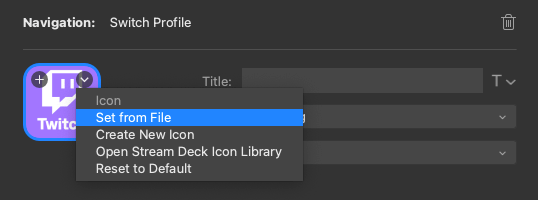
When you've created a key on your Stream Deck and downloaded your custom key from this creator, select the key you would like to customise the icon for and then you can either:
- Drag and drop your custom icon on to the icon preview in the icons property pane
- Click the small arrow in the top right of the icon preview in the icons property pane, click "set from file" and then select your downloaded icon
Can I save my icon designs for later?
Yes! Use the Templates panel to save your designs. You have two options:
- Save to browser storage: Click "Save Current Design" to save templates locally. These are stored in your browser's local storage. Convenient, but may be lost if you clear site data, switch devices, or (in Safari) don't visit for 7 days. Installing the app to your Home Screen avoids the Safari limit.
- Create a shareable link: Click the link icon next to the save button to copy a bookmarkable URL containing your entire design. Bookmark this link or share it with others!
Note about custom images: If your design uses your own image (background or icon), the image itself cannot be stored in templates or URLs. The template will save with a placeholder, and you'll need to select the image again when loading the template. This is due to browser security restrictions and URL length limits.
Privacy & Security
100% client-side processing: Your images are never sent to any server. All image processing, compositing, and exporting happens entirely in your browser using JavaScript. Your designs stay completely private on your device.
The only data stored is your design settings in your browser's local storage, and this never leaves your device. We use privacy-friendly analytics (Matomo) to count page views, but no personal data or images are ever collected or transmitted.
App Information
Unofficial / independent: This is a community-made tool for creating button icons that are Stream Deck-compatible. It is not affiliated with, endorsed by, sponsored by, or otherwise approved by Corsair, Elgato, or the Stream Deck brand.
“Stream Deck” and “Elgato” are trademarks of Corsair Memory Inc. Other product names mentioned (such as Loupedeck, Razer, Logitech, MX Creative Console, Logi Options+, Ulanzi, Ulanzi Studio, Ajazz, Mirabox, Stream Dock, Touch Portal, Macro Deck, Deckboard, Bitfocus Companion, OpenDeck and StreamController) are trademarks of their respective owners. They are used here only to describe compatibility and the intended use of the tool, and no affiliation or endorsement is implied.
This website does not include or redistribute any Elgato software or proprietary assets. It simply helps you generate image files you can import into the Stream Deck software.
No warranty: This tool is provided “as is” and “as available”, without warranties of any kind (express or implied), including but not limited to merchantability, fitness for a particular purpose, and non-infringement. You use it at your own risk. To the maximum extent permitted by law, the author is not liable for any claim, damages, or other liability arising from your use of the tool.
Lovingly made by freelance web developer Adam Greenough using icons from Google Material Symbols (Apache 2.0 License).
If you've found this helpful, please consider supporting me on Ko-fi to fund more caffeine-fuelled development. To report a bug or request a feature, please visit the GitHub code repository.
Frequently asked questions
How do I make my own Stream Deck icons?
Pick an icon from 3,900+ Material Symbols, add emoji or use your own image, then add text and style the background, border and effects. Download it as a PNG (or animated GIF) and set it on a key in the Stream Deck software. No design skills or image editor needed.
Is Button Designer free?
Yes. It is completely free, with no sign-up and no account. Just design your icon and download it.
Do I need to download or install anything?
No. It runs in any modern browser on Windows, macOS, Linux, ChromeOS, iOS or Android. If you like, you can install it as an app from your browser and it will also work offline.
Are my images sent anywhere?
No. Everything happens in your browser, so images you add never leave your device.
Can I make animated GIF icons?
Yes. Use an animated GIF as your icon or background, or turn on an RGB Cycle or RGB Glow effect, and your design will export as an animated GIF. Stream Deck and many alternatives can play animated GIFs on keys.
Which export size should I choose?
144×144px (the default) looks sharp on most Stream Deck-compatible keys. Choose 256, 288 or 512px if your device or app has larger or higher-resolution buttons, or if you want extra detail to scale down from.
Can I design Stream Deck+ dial and touch strip images?
Yes. Switch the canvas to Touch strip to design a Stream Deck+ dial segment, exported at 200×100px (or 400×200px for HD).
How do I make a matching set of icons?
Style your first icon, save it as a template, then load it and change only the icon and text for each new key. You can also copy a shareable link to keep or share the whole style.
Does it work on phones and tablets?
Yes. The designer works on phones and tablets as well as desktop, which is handy for phone-based decks like Touch Portal, Macro Deck or Deckboard.
Can I use the icons I make anywhere?
Yes, the icons you design are yours to use. The built-in icons are Google Material Symbols, released under the Apache 2.0 licence. Just make sure you have the rights to any images you add yourself.
Will these icons work on Stream Deck MK.2, XL, Mini, Neo and Stream Deck+?
Yes. Every Stream Deck-compatible model accepts square custom key images, and the Stream Deck software scales them to fit each model's keys, so one design works across your whole setup.
Can I use these icons with Stream Deck Mobile?
Yes. Set them as custom key icons in the Stream Deck software just as you would for a hardware deck. On a sharp phone or tablet screen, the 256px or 512px export looks crispest.
Does it work with Stream Deck alternatives?
Yes. Icons export as standard PNG images (or animated GIFs), so they work with any macro pad, stream controller or touchscreen deck app that lets you set a custom key image. Pick the export size that suits your device, download, and import it the same way you would any other icon.
How do I make custom icons for Loupedeck Live, Live S or CT?
Design your icon here and download it as a PNG, then set it as a custom image for the touch button or action in the Loupedeck software. The default 144px export scales down cleanly to Loupedeck's smaller touch buttons.
Can I make custom icons for the Razer Stream Controller?
Yes. The Razer Stream Controller uses Loupedeck software, so you can set any PNG you make here as a custom touch button image, just as you would on a Loupedeck Live.
Can I make custom icons for the Logitech MX Creative Console?
Yes. Download your icon as a PNG and set it as a custom image for an LCD key on the MX Creative Keypad in Logi Options+.
Can I make custom icons for Ulanzi stream controllers like the D200?
Yes. Ulanzi Studio accepts custom key images, so you can download a PNG from here and choose it as the icon for any key.
Can I make custom icons for Ajazz and Mirabox stream docks?
Yes. Ajazz (such as the AKP153) and Mirabox stream docks use Stream Dock software, which lets you set a custom image on each key. Download a PNG here and pick it as the key's icon.
How do I make custom Touch Portal button icons?
Design and download your icon here, then add it as a custom icon in the Touch Portal button editor. Phone and tablet screens are sharp, so the 256px or 512px export gives the crispest buttons.
Can I make icons for Macro Deck?
Yes. Import the PNGs (or animated GIFs) you make here into a Macro Deck icon pack, then assign them to your action buttons.
Can I make custom Deckboard button icons?
Yes. Deckboard lets you use your own image as a button icon, so any icon you design and download here will work. Try a larger export for sharp results on phones and tablets.
Can I make button images for Bitfocus Companion?
Yes. Companion lets you upload a PNG as a button image, so you can give your broadcast and production controls a consistent, readable look without opening an image editor.
Can I make icons for OpenDeck or StreamController on Linux?
Yes. Both OpenDeck and StreamController let you set custom images on Stream Deck-compatible keys, and this designer runs in any browser on Linux, so you can create and use your icons without installing anything.